

In today’s digital landscape, having a visually appealing website and great content isn’t enough to rank well on search engines like Google. Behind every successful website lies a strong technical foundation that ensures search engines can easily find, crawl, and understand your pages.
This is where Technical SEO comes into play — the essential process of optimizing your website’s backend structure and performance. From site speed and mobile-friendliness to secure HTTPS and clean URL architecture, technical SEO makes your website both search-engine friendly and user-friendly. In this guide, we’ll break down everything you need to know about technical SEO and how to make your website truly search-friendly.
What is Technical SEO and Why is it Important?
Technical SEO focuses on optimizing your website’s backend and infrastructure, ensuring that search engines like Google can efficiently crawl, index, and interpret your content. It focuses on elements like site speed, mobile-friendliness, security (HTTPS), structured data, and clean URL structure — all the “behind-the-scenes” factors that make your site both search engine and user-friendly.
Why it’s important:
-
- Better rankings: Search engines reward websites that are technically sound with higher visibility.
- Improved user experience: Fast, mobile-friendly, and secure sites keep visitors engaged.
- Higher crawl efficiency: Ensures Google can find and index your most important pages.
- Foundation for SEO success: Without strong technical SEO, even great content and backlinks may not reach their full ranking potential.
Think of technical SEO as the foundation of a house — if it’s weak, everything built on top (content & links) won’t hold up in the long run.
How to Perform Technical SEO: Step-by-Step Guide
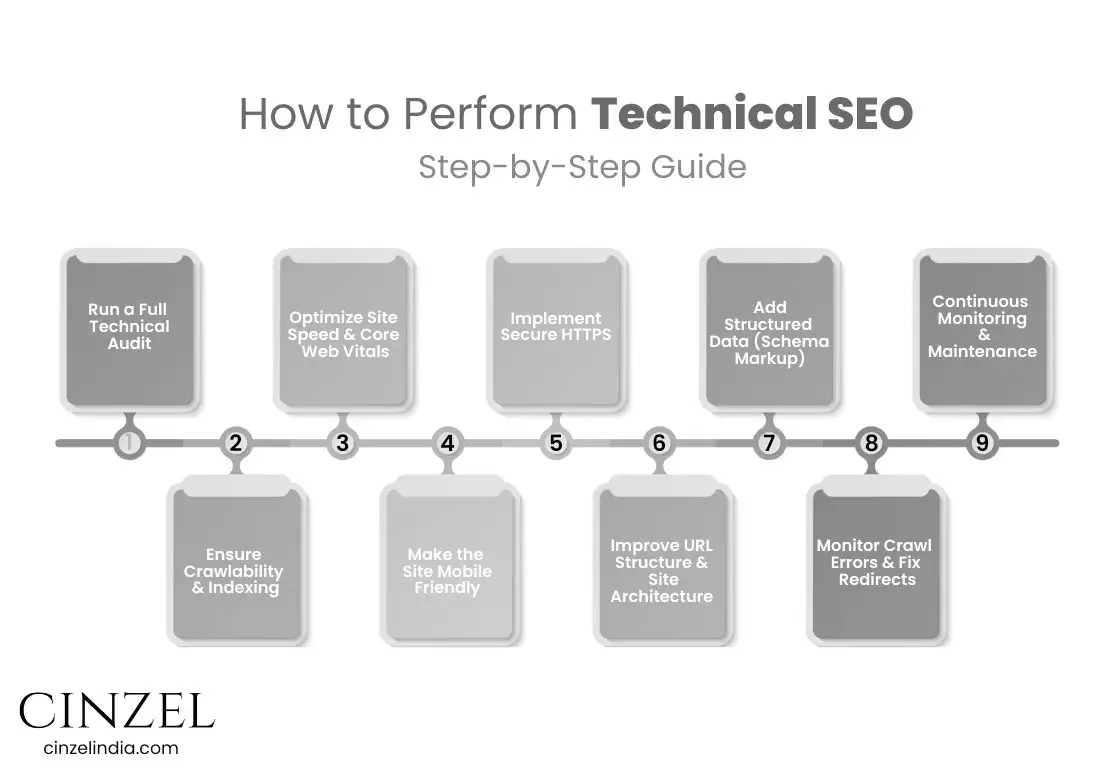
Technical SEO may sound complex, but when broken down into clear steps, it becomes much easier to implement. Here’s a practical guide to optimizing your website’s backend for better rankings and user experience:
1. Run a Full Technical Audit
Use tools like Google Search Console, Screaming Frog, or Semrush to uncover crawl errors, indexing issues, broken links, duplicate content, and speed bottlenecks.
2. Ensure Crawlability & Indexing
Fix broken links and remove crawl barriers.
Ensure important pages are linked internally.
Submit an updated XML sitemap.
Configure robots.txt correctly (don’t block important resources).
3. Optimize Site Speed & Core Web Vitals
Compress and lazy-load images.
Minify CSS, JavaScript, and HTML.
Implement browser caching and leverage a Content Delivery Network (CDN).
Track Core Web Vitals (LCP, CLS, INP) to optimize user experience.
4. Make the Site Mobile-Friendly
Since Google uses mobile-first indexing, your site must work flawlessly across devices.
Use responsive design.
Keep font sizes readable and buttons tap-friendly.
Avoid intrusive pop-ups or interstitials.
5. Implement Secure HTTPS
Install an SSL certificate so your website runs on HTTPS. This builds user trust, protects sensitive data, and boosts rankings.
6. Improve URL Structure & Site Architecture
Keep URLs short, clean, and descriptive.
Use a logical hierarchy so important pages are never more than 3 clicks from the homepage.
Use canonical tags to avoid duplicate content issues.
7. Add Structured Data (Schema Markup)
Implement JSON-LD schema to help search engines understand your content better and unlock rich results (e.g., star ratings, FAQs, events).
8. Monitor Crawl Errors & Fix Redirects
Resolve 404 errors and redirect chains.
Make sure moved pages use 301 redirects.
Regularly check Google Search Console for coverage issues.
9. Continuous Monitoring & Maintenance
Technical SEO is not a one-time fix. Keep monitoring:
Site speed and Core Web Vitals.
Broken links or crawl issues.
Index coverage in Google Search Console.
Deep dive — Key elements of Technical SEO
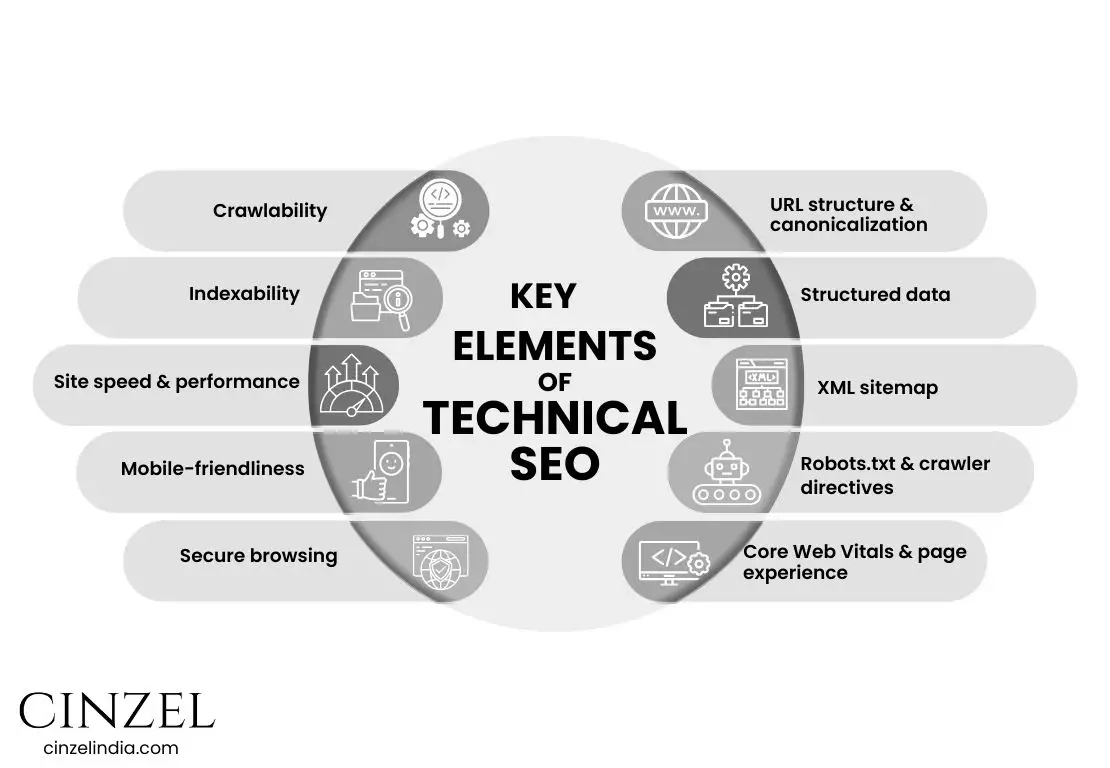
Crawlability
- What — The ability for search engine bots to discover and follow pages and links on your site.
- Why it matters — If bots can’t reach pages, those pages won’t be found or ranked.
- How to audit — Use Google Search Console (Coverage), crawl with Screaming Frog, check server logs for bot activity and 404 spikes.
- Fixes / best practices — Flatten deep link chains, make important pages reachable from the main nav or hub pages, avoid excessive JS-only navigation, and consolidate duplicate URLs.
- KPIs / tools — Indexed pages vs. submitted pages (GSC), crawl frequency from server logs, Screaming Frog, Log file analyzer.
Indexability
- What — Whether discovered pages are allowed and eligible to be stored in a search engine’s index.
- Why it matters — Pages can be crawlable but intentionally or accidentally blocked from indexing (no index, canonical pointing elsewhere), preventing them from appearing in search.
- How to audit — URL Inspection (GSC), check meta robots tags, canonical tags, and header responses.
- Fixes / best practices — Remove unintended no index, correct canonical tags, resolve redirect chains, and ensure pages return 200 (or 301 for intended redirects).
- KPIs / tools — GSC URL Inspection, index coverage reports, site: queries for spot checks.
Site speed & performance
- What — How quickly pages load and become usable for visitors (server response, asset load, render time).
- Why it matters — Faster sites improve UX, reduce bounce, and are favored by search engines.
- How to audit — Run PageSpeed Insights, Lighthouse, and Real User Monitoring (RUM) to capture lab + field data.
- Fixes / best practices — Optimize images (responsive & lazy-load), enable caching, use a CDN, minimize render-blocking scripts, compress assets, and optimize server TTFB.
- KPIs / tools — LCP (Largest Contentful Paint), TTFB, Time to Interactive, RUM metrics, PageSpeed Insights, Lighthouse.
Mobile-friendliness / mobile-first
- What — Site layout, resources and functionality that work well on phones and tablets.
- Why it matters — Google indexes and evaluates pages using mobile-first principles; poor mobile UX harms visibility and conversions.
- How to audit — Mobile Usability and Mobile-First reports in GSC, Lighthouse mobile audits, manual device testing.
- Fixes / best practices — Responsive design, readable font sizes, adequate tap targets, avoid interstitials that block content, and reduce mobile payloads.
- KPIs / tools — GSC Mobile Usability, Lighthouse mobile scores, session bounce and conversion rates on mobile.
Secure browsing (HTTPS)
- What — Site served over TLS (HTTPS) with a valid SSL certificate.
- Why it matters — HTTPS protects user data, preserves referral data, builds user trust, and is a lightweight ranking signal.
- How to audit — Check for a valid certificate, mixed content warnings, and all HTTP URLs 301 → HTTPS.
- Fixes / best practices — Install/renew certificates, fix mixed content, update canonical/sitemap/links to HTTPS, monitor redirects.
- KPIs / tools — Security warnings in browser, GSC coverage/security issues, SSL Labs tests.
URL structure & canonicalization
- What — Clean, consistent URLs and correct canonical tags that tell search engines the preferred version of each resource.
- Why it matters — Messy URLs and duplicate content dilute ranking signals and confuse crawlers.
- How to audit — Crawl site to find duplicate content/parameters, check canonical tags, monitor redirect chains.
- Fixes / best practices — Use short, descriptive paths; pick one canonical domain (www vs non-www); implement 301 for moved pages; use rel=canonical only when necessary.
- KPIs / tools — Screaming Frog, GSC Coverage, canonical inspection via URL Inspection.
Structured data (Schema markup)
- What — JSON-LD/microdata that adds machine-readable context (product, article, recipe, event, organization, etc.).
- Why it matters — Helps search engines understand content and can enable rich results (rich snippets, knowledge panels) which improve CTR.
- How to audit — Use Google’s Rich Results Test and the Rich Results Status Report in Search Console after deployment.
- Fixes / best practices — Implement JSON-LD, validate markup, provide accurate fields (price, availability, author, dates), avoid markup that misrepresents content.
- KPIs / tools — Rich Results Status Report (GSC), Structured Data Testing Tools, CTR uplift from Search Console impressions.
XML sitemap
- What — A machine-readable file listing the URLs you want search engines to prioritize.
- Why it matters — Sitemaps help crawlers discover and prioritize important pages, especially on large or new sites.
- How to audit — Ensure sitemap is current, returns 200, references canonical URLs, and is submitted in GSC; check that listed URLs are indexable.
- Fixes / best practices — Split large sitemaps with an index file, include lastmod appropriately, keep only canonical, high-quality URLs, and update automatically.
- KPIs / tools — GSC Sitemaps report, 200 response checks, sitemap index coverage.
Robots.txt & crawler directives
- What — A text file that gives crawling instructions (which paths to allow/disallow) and can point to sitemaps.
- Why it matters — Controls crawler behavior and can prevent wasting crawl budget on irrelevant or duplicate areas; note robots.txt is advisory (crawlers may ignore it).
- How to audit — Test with robots.txt tester (GSC), check for accidental disallows (e.g., blocking CSS/JS), and ensure sitemap path is declared.
- Fixes / best practices — Only disallow non-public or heavy parameterized sections, never block CSS/JS needed for rendering, keep file simple and version-controlled.
- KPIs / tools — GSC robots tester, server logs to confirm Googlebot obeys rules, automated tests in CI.
Core Web Vitals & page experience
- What — A focused set of user-centered metrics (loading, interactivity, visual stability) used by Google to measure page experience — typically LCP, INP (or TBT historically), and CLS. These metrics are captured from real user field data.
- Why it matters — Core Web Vitals are part of the Page Experience signals and can affect search ranking and CTR by indicating how users perceive your site.
- How to audit — Use the Core Web Vitals report in GSC (field data), Lighthouse for lab data, and RUM to capture real-user performance.
- Fixes / best practices — Improve LCP by optimizing hero images and server response; improve interactivity by reducing JS work (code-splitting, deferred scripts); reduce CLS by reserving image/fonts sizes and avoiding layout-shifting ads.
- KPIs / tools — GSC Core Web Vitals report, PageSpeed Insights, Lighthouse, Real User Monitoring (RUM), and synthetic testing.
What role does technical seo play in seo strategy?
Technical SEO forms the foundation of your entire SEO strategy. Think of it as the invisible framework that makes your content and backlinks actually work. Without it:
Search engines may not crawl your site efficiently – meaning some of your best pages could remain undiscovered.
- Indexing problems can occur – even if content is found, it may not be stored properly in Google’s index.
- Poor technical setup reduces visibility – broken links, slow load times, or missing sitemaps all make ranking harder.
- User experience suffers – visitors leave quickly if your site feels slow or insecure, which indirectly hurts rankings.
In simple terms, technical SEO ensures that all your other SEO efforts — content creation, keyword targeting, link building, and branding — can deliver their full potential. A strong technical foundation means search engines understand your site, users enjoy browsing it, and every optimization you add afterward has maximum impact.
How to identify if a website is technically optimized for SEO?
You can identify if a website is technically optimized for SEO by checking key technical areas that influence crawlability, indexability, performance, and user experience. Here’s a structured approach:
1. Crawlability & Indexing
Use Google Search Console to verify whether key pages are indexed and to identify any crawl errors
Do a “site:” search in Google – Compare indexed pages to the actual number of pages you have.
Run a crawl with Screaming Frog or Sitebulb – Look for broken links, blocked resources, or inaccessible pages.
2. Site Speed & Core Web Vitals
Test in PageSpeed Insights or GTmetrix – Check for fast loading (especially LCP under 2.5s).
Review Core Web Vitals in Google Search Console for real-world performance data.
3. Mobile-Friendliness
Use Google’s Mobile-Friendly Test to ensure the site is responsive and works well on all devices.
4. HTTPS Security
Verify the site uses HTTPS with a valid SSL certificate and no mixed content warnings.
5. URL Structure & Navigation
URLs should be short, descriptive, and consistent.
Navigation should be logical, with important pages no more than 3 clicks from the homepage.
6. Structured Data
Use Google’s Rich Results Test to check for correct Schema markup.
7. XML Sitemap & Robots.txt
Ensure the XML sitemap lists all important, indexable pages.
Check the robots.txt file to avoid accidental blocking of important pages.
8. Duplicate Content & Canonicals
Confirm correct use of canonical tags to prevent duplicate content issues.
9. Error-Free Browsing
No 404 errors for important pages.
No redirect loops or chains.
10. Continuous Monitoring
Set up ongoing monitoring in GSC, Semrush, or Ahrefs to track changes, errors, and performance over time.
What is Schema Markup, and Do You Need It?
Schema markup is a type of code (structured data) that you add to your website to help search engines better understand your content. Think of it as a translator between your webpage and Google — it tells search engines exactly what your content means, not just what it says.
For example:
- Without schema, Google might see a block of text saying “Chocolate Cake Recipe” but not know if it’s an article, a product, or a recipe.
- With schema, you can explicitly tell Google, “Hey, this is a recipe, it takes 45 minutes to cook, and it serves 6 people.”
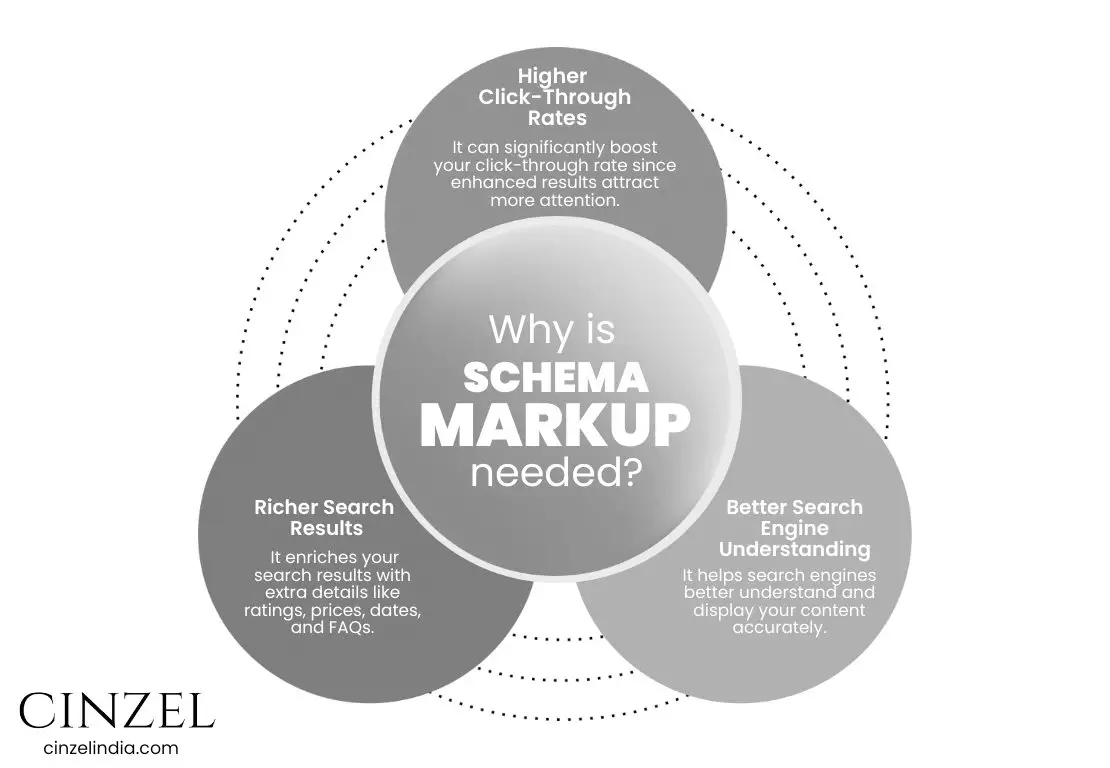
Why is it needed:
- Richer Search Results - It enriches your search results with extra details like ratings, prices, dates, and FAQs.
- Better Search Engine Understanding - It helps search engines better understand and display your content accurately.
- Higher Click-Through Rates - It can significantly boost your click-through rate since enhanced results attract more attention.
Do you need it?
Yes — if you want better visibility and richer search results, schema markup is worth implementing. It’s especially useful for blogs, recipes, events, products, reviews, and local businesses.
How can you check if your site is too slow?
Checking your website’s speed is easier than you might think, and it’s crucial for both user experience and SEO. Here are some simple, effective ways to find out if your site is too slow:
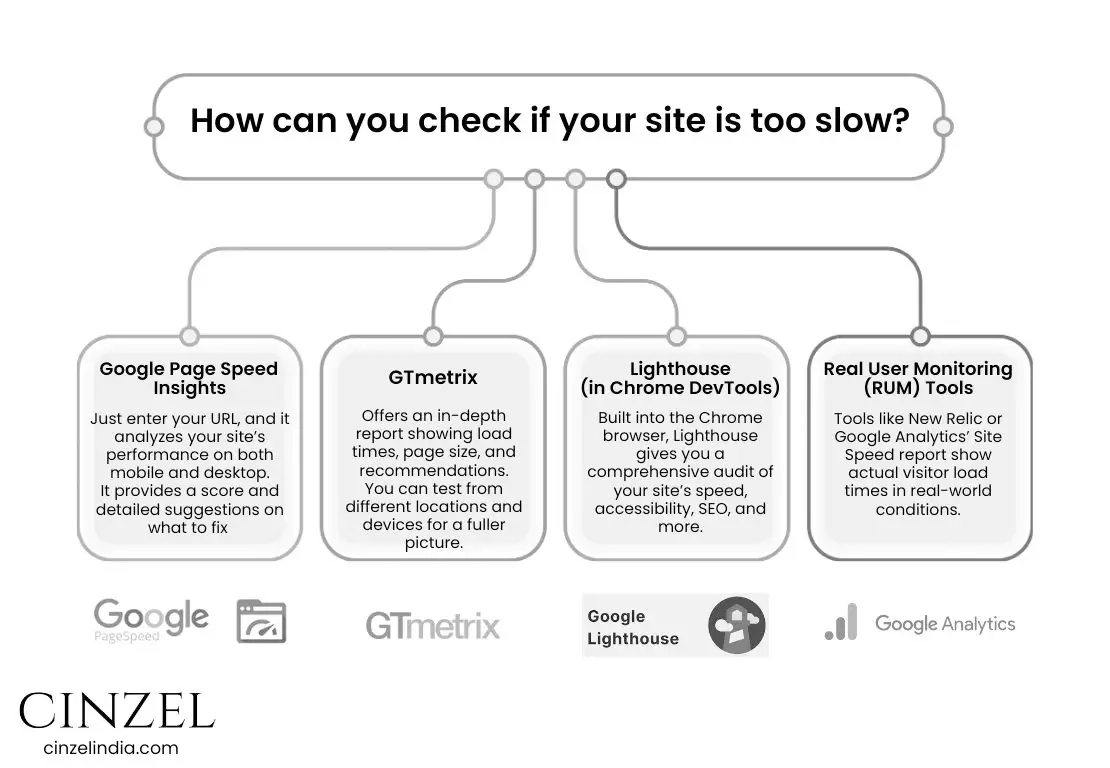
Google PageSpeed Insights
Just enter your URL, and it analyzes your site’s performance on both mobile and desktop.
It provides a score and detailed suggestions on what to fix (like image optimization, caching, or code issues).
GTmetrix
Offers an in Gt metrix, page size, and recommendations.
You can test from different locations and devices for a fuller picture.
Lighthouse (in Chrome DevTools)
Built into the Chrome browser, Lighthouse gives you a comprehensive audit of your site’s speed, accessibility, SEO, and more.
Real User Monitoring (RUM) Tools
Tools like New Relic or Google Analytics’ Site Speed report show actual visitor load times in real-world conditions.
By regularly monitoring your site speed with these tools, you can keep your website fast and user-friendly.
Is Your JavaScript Stopping Google from Seeing Your Website?
If your site relies heavily on JavaScript SEO for loading content, there’s a chance that search engines like Googlebot might not be seeing everything you want them to. While JavaScript can create highly interactive, modern websites, it also adds a layer of complexity for crawling and indexing. Google’s crawler has to render JavaScript before it can index the content — and if that process fails or is delayed, important parts of your page could remain invisible in search results.
Common issues include:
- Delayed content rendering (Googlebot might leave before the page content appears)
- Blocked resources (scripts or files restricted by robots.txt)
- Client-side rendering without server-side rendering (SSR) fallback
The result? Lower rankings, reduced website visibility, and missed organic traffic opportunities. The good news is that with techniques like Server-Side Rendering, dynamic rendering, or pre-rendering, you can ensure that both users and search engines get the full page content.
Common Mistakes to Avoid in Technical SEO
- Slow loading speed – causes users to bounce quickly.
- Duplicate content – confuses search engines and splits ranking power.
- Broken links (404 errors) – hurt user trust and SEO.
- Blocking important pages in robots.txt – prevents indexing.
- Unoptimized images – heavy images drastically slow down sites.
- No SSL certificate (HTTP instead of HTTPS) – flagged as “Not Secure.”
- Missing mobile optimization – frustrates mobile-first users.
Technical SEO Checklist: Your Step-by-Step Path to a High-Performing Website
- Enable HTTPS with an SSL certificate.
- Optimize site speed (compress images, minify code, use CDN).
- Make sure your website is mobile-friendly.
- Submit XML Sitemap in Google Search Console.
- Set up and optimize robots.txt.
- Implement schema markup for rich snippets.
- Fix broken links and redirects.
- Ensure clean and keyword-friendly URLs.
- Regularly audit crawl errors and indexing issues.
- Avoid duplicate content with canonical tags.
Wrap-Up: How Technical SEO Powers Your Website’s Growth and Visibility
For businesses investing in Technical SEO is no longer optional — it’s essential. A technically optimized website ensures that both users and search engines can navigate and trust your site, resulting in better rankings, more traffic, and ultimately more conversions.
By avoiding common mistakes and following the checklist, you’ll be well on your way to creating a search-friendly website that stands out in competitive digital marketplace.
Technical SEO FAQs Every Website Owner Should Know
1. How does Technical SEO differ from On-Page SEO?
Technical SEO deals with your website’s backend structure (speed, crawlability, indexing, HTTPS, mobile performance), while On-Page SEO focuses on optimizing content elements like titles, meta tags, and keywords. Both work together for ranking success.
2. How do I know if my website needs Technical SEO?
If your site loads slowly, isn’t mobile-friendly, has indexing issues, or doesn’t appear in Google search despite publishing content, it’s a sign you need a Technical SEO audit.
3. Is Technical SEO a one-time process or ongoing?
It’s not one-and-done. Search engines update their algorithms, and websites grow/change. Technical SEO requires regular monitoring, audits, and fixes to maintain search visibility.
4. How long does it take to see results from Technical SEO?
Improvements like fixing crawl errors or speeding up a site can show results within weeks. Bigger changes (structured data, site architecture) may take 2–3 months for Google to fully reflect in rankings.
5. Do small businesses in Noida really need Technical SEO?
Yes. Even local businesses benefit. For example, if your website is slow or not mobile-friendly, customers may bounce to competitors. Technical SEO ensures you stay visible in Google Maps, local searches, and mobile devices.
6. What tools are best for Technical SEO audits?
Some trusted tools are:
- Google Search Console (free)
- Screaming Frog (crawl analysis)
- Semrush / Ahrefs (SEO insights)
- GTmetrix / PageSpeed Insights (speed check)
7. Can I do Technical SEO myself or do I need an expert?
Basic checks like sitemap submission, mobile testing, or fixing broken links can be DIY. But deeper tasks like schema implementation, Core Web Vitals optimization, or log file analysis usually need an SEO specialist.
8. What are Core Web Vitals, and why should I care?
They’re Google’s user-experience signals measuring loading speed, interactivity, and visual stability. Poor scores can lower rankings and frustrate users, so optimizing them is crucial.
9. Does HTTPS really affect SEO rankings?
Yes. Google confirmed HTTPS is a ranking signal. Beyond SEO, it builds trust with visitors and protects sensitive user data.
10. How frequently should an XML sitemap be updated?
Update your sitemap whenever new important pages are added or old ones are removed. Ideally, it should auto-update through your CMS or plugin.
11. My site looks fine on the desktop. Why does mobile SEO matter?
Google uses mobile-first indexing, meaning it ranks your site based on the mobile version. A poor mobile experience can tank rankings even if the desktop looks perfect.
12. Can bad Technical SEO stop my content from ranking?
Yes. Even the best-written blogs won’t rank if search engines can’t crawl, index, or understand them due to technical issues.
13. How does Technical SEO improve conversions, not just rankings?
A faster, secure, mobile-friendly site reduces bounce rates, builds trust, and keeps visitors engaged — directly improving leads and sales.
14. What’s the biggest mistake businesses make in Technical SEO?
Common pitfalls include: blocking important pages in robots.txt, ignoring site speed, not using HTTPS, broken redirects, or neglecting mobile optimization.
15. How do I find out if JavaScript is hurting my SEO?
Check if key content is visible in Google’s “View Cached Page” or use Search Console’s URL inspection. If content is missing, Google may not be rendering your JS properly.
---------------------------------------------------------------------
Related Articles You’ll Find Helpful:
